
What are Deployment Pipelines?
- Allow you to deploy changes in Fabric items between workspaces/environments (e.g., Dev → Test → Prod).
- Help teams develop, validate, and release content in a controlled way.
- No code required – everything is managed through the UI.
Pipeline Structure
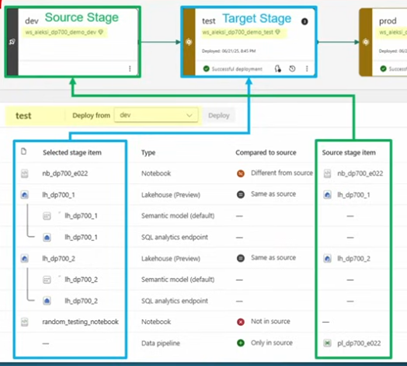
- The UI shows blocks called stages.
- Each stage = one step in the content lifecycle (e.g., Dev, Test, Prod).
- Each stage is linked to a separate workspace.
- Changes are compared between stages so you know what needs deploying.
Stage Comparison in UI
- When you select a stage:
- Left column: Items in the selected stage.
- Right column: Items in the source stage.
- This helps you see what’s new, changed, or missing.
Item Pairing & Status
- Fabric uses item pairing to match items between stages.
- Matching is based on internal ID, not name (renames are recognised).
- Statuses:
- Same as source – No changes detected.
- Different from source – Item has changed.
- Only in source – New item, not yet deployed.
- Not in source – Exists only in target (likely created manually).
Selective Deployment
- You don’t have to deploy everything at once.
- Pick specific items to deploy.
Deployment Rules
- Let you adjust settings like data sources or parameters per stage.
- Ensures each environment uses the correct configuration.
- Reduces manual changes and errors.
Lakehouse & Deployment Pipelines in Fabric
Deployment pipelines move Lakehouse metadata, including shortcuts, but do not copy data or table schemas. After deployment, shortcuts still point to the original source, and the Lakehouse will be empty unless you populate it.
To migrate schema and data:
- Use notebooks or pipelines to recreate tables and load data.
- Treat schema/data as code for CI/CD (store scripts in Git, deploy via pipelines).
Best Practices
- Enable Git integration in the Dev workspace only (not in Prod).
- Use Variable Library to set environment-specific variables.
- Keep Prod stable deploy via pipeline, not manual edits.