
Version: 1.0
Owner: Regional Finance Director
Prepared by: Data Engineering
1. Purpose
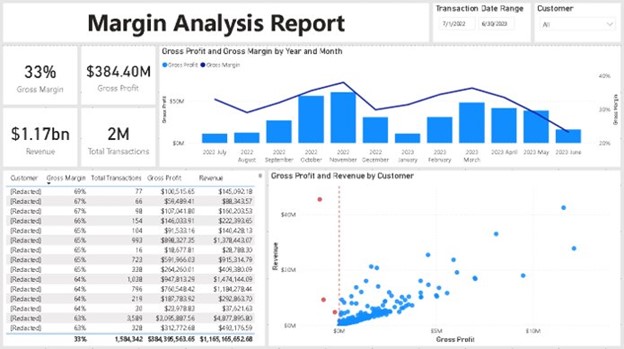
The purpose of this report is to provide clear and consistent visibility of margin performance across all active projects, comparing the originally approved bid margin with the latest forecast outturn margin. The report will support financial oversight, early risk identification, and commercial performance management at project, PRU, and regional levels.
2. Objectives
- Allow Finance to identify projects with margin erosion or variance from approved bid assumptions.
- Provide a structured view of bid vs forecast values and margins.
- Support monthly financial reviews, period-end accounts, and PRU-level consolidation.
- Enable investigation of the drivers of margin change.
- Provide consistent, auditable figures aligned with Data Warehouse definitions.
3. Primary User Story
As a Regional Finance Director,
I need to compare the current forecast outturn margin for each project against the original bid margin,
so that I can identify margin slippage early, investigate causes, and take corrective action where needed.
4. Stakeholders
| Stakeholder | Role |
|---|---|
| Regional Finance Director | Sponsor, primary consumer |
| PRU Managers / Programme Leads | Review project performance |
| Project Managers | Provide updated forecasts |
| Financial Accounts Team | Use outputs for month-end analysis |
| Data Engineering | Produce and maintain the report/data pipeline |
| PMO (if applicable) | Monitor delivery performance and RAG status |
5. Scope
In Scope
- All active, planned, and recently closed customer projects.
- Bid (baseline) and forecast (current) commercial values.
- Margin and value variance calculations.
- Reporting at project and PRU level.
Out of Scope (initially)
- Earned value or % complete metrics.
- Scenario or sensitivity analysis.
- Time-phased forecasting.
- Commentary capture (may be considered later).
6. Data Requirements
6.1 Core Data Fields
The following fields are required to deliver the minimum viable product (MVP):
| Field | Description |
|---|---|
| Project ID | Unique project identifier |
| Project Name | Full name of the project |
| PRU | Programme Reporting Unit / Cost Centre |
| Bid Value (£) | Revenue or total contract value at bid approval |
| Current Value (£) | Latest forecast revenue/contract value |
| Bid Margin (%) | Margin approved at contract/bid stage |
| Current Outturn Margin (%) | Latest forecast margin |
| Start Date | Project commencement date |
| Expected Completion Date | Current projected finish date |
6.2 Derived Fields
These fields will be calculated within the report or DataMart:
| Derived Field | Calculation |
|---|---|
| Margin Variance (£) | (Current Outturn Margin% × Current Value) − (Bid Margin% × Bid Value) |
| Margin Variance (%) | Current Outturn Margin% − Bid Margin% |
| (Exact formulas may be adjusted based on Finance governance definitions.) |
6.3 Recommended Additional Fields
These are not required for MVP but commonly expected in finance packs:
| Field | Reason |
|---|---|
| Customer | Enables customer-level analysis |
| Project Manager | Supports accountability and governance |
| Bid revenue / Bid cost | Transparency for margin calculations |
| Forecast revenue / Forecast cost | Supports audit and reconciliation |
| Project status (Active/Closed/On Hold) | Essential for filtering |
| RAG or PMO status (if available) | Adds context for risk |
| Reason for margin movement | Helps commercial assurance |
7. Data Sources
- Project base data: IFS / Project core tables / CDM project_core
- Bid values: Bid baseline stored in opportunity/project link or project baseline tables
- Forecast values: Current forecast from project cost/revenue views (project_value, project_cost, project_revenue)
- Dates: Project schedule or project_details view
- PRU: Project organisational alignment via project or cost centre master data
(Exact table references will be confirmed during technical design.)
8. Business Rules
- Bid values and bid margin must come from the approved bid/baseline, not initial estimates.
- Forecast values must be the latest approved forecast (from project managers or financial planning data).
- Projects with no approved bid should be excluded or flagged.
- Suspended or dormant projects should be clearly labelled.
- Margin must use the Finance-approved formula for both bid and forecast.
- Where dates are missing or incorrect, the system should flag for review.
9. Functional Requirements
9.1 Report Outputs
- Tabular view listing all projects and their bid vs forecast margin.
- Ability to filter by PRU, Region, Customer, Project Manager.
- Highlight projects with margin variance outside defined thresholds (e.g., >5% drop).
- Export options (CSV, Excel, Power BI export).
9.2 Frequency
- Refresh daily via Data Warehouse load (or as aligned with project forecast updates).
9.3 Security
- Users must only see projects within their authorised region/PRU.
- Finance users see all data; PMs see only their own projects.
10. Non-Functional Requirements
| Area | Requirement |
|---|---|
| Data Quality | Must use governed bid and forecast sources |
| Performance | Report should load within 5 seconds for up to 5,000 projects |
| Auditability | Source fields traceable to CDM views |
| Consistency | Margin formulas aligned with Finance policies |
| Maintainability | Report should use CDM-standard core & value views |
11. Out-of-Scope Considerations for Future Iteration
- Forecast time-phasing (monthly phasing).
- Cashflow projections.
- Risk-adjusted margin.
- Integration with commentary capture.
- Portfolio “drill-through” to invoices or timesheets.
12. Acceptance Criteria
The report is accepted when:
- All required fields (Section 6.1) are present and correct.
- Derived fields (Section 6.2) calculate consistently with Finance definitions.
- The report displays all active projects in the region.
- Margin variances are correctly highlighted.
- Access control meets Finance and Information Governance standards.
- Data from bid and forecast sources reconcile with period-end totals.
13. Delivery Plan (High Level)
- Dream – Confirm finance definitions (bid margin, forecast margin, variance).
- Discover – Map data sources from CDM views and IFS baseline/forecast tables.
- Develop _ Build CDM sub-view (project_margin_variance).
- Deliver – Develop Power BI / Reporting layer.
- Define & Document – Validate with Finance (two review cycles).
- Deploy to production.
- Monitor quality in first two periods.